
Free
A place to join in and get riding.
£0
- Join one club
- Club feed and event RSVPs
- Organise and lead club rides
- Record rides and use the Bike Garage

Plan the Sunday ride. Know who’s coming. Keep your routes, conversations and club life together.
iPhone. Android. And a home on the web.
Open club dashboard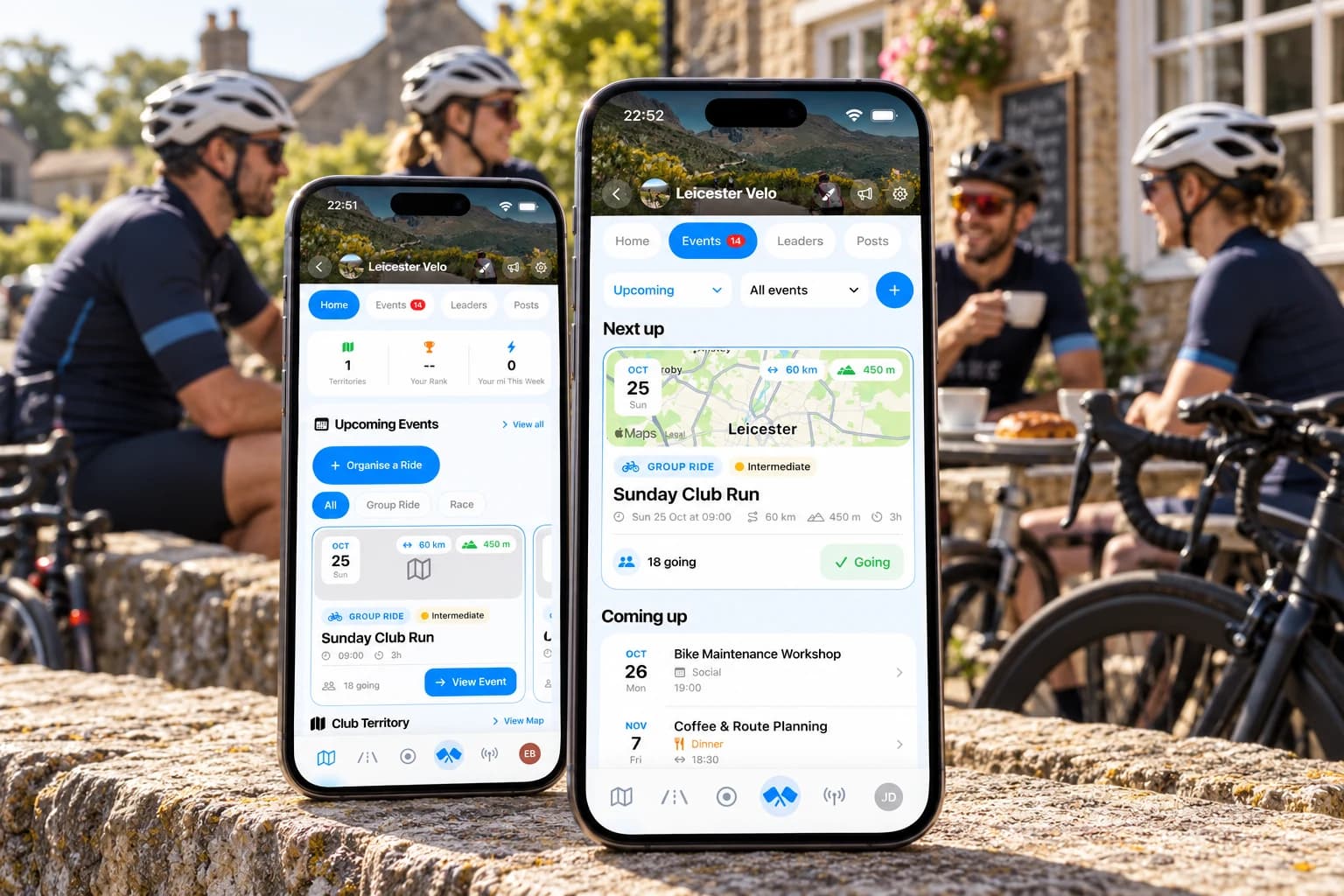
App screens recreated from current simulator captures. Fictional club and sample activity. iPhone interface shown.
Routes, meeting points and everything riders need to know.
Ride leaders, back markers and pace groups, all in one place.
Stay in touch, share the moments and keep your club active year round.
Plan rides
A Sunday club run, a midweek chain gang or a café spin. Give every group ride a plan riders can find, with the details settled before the rollout.
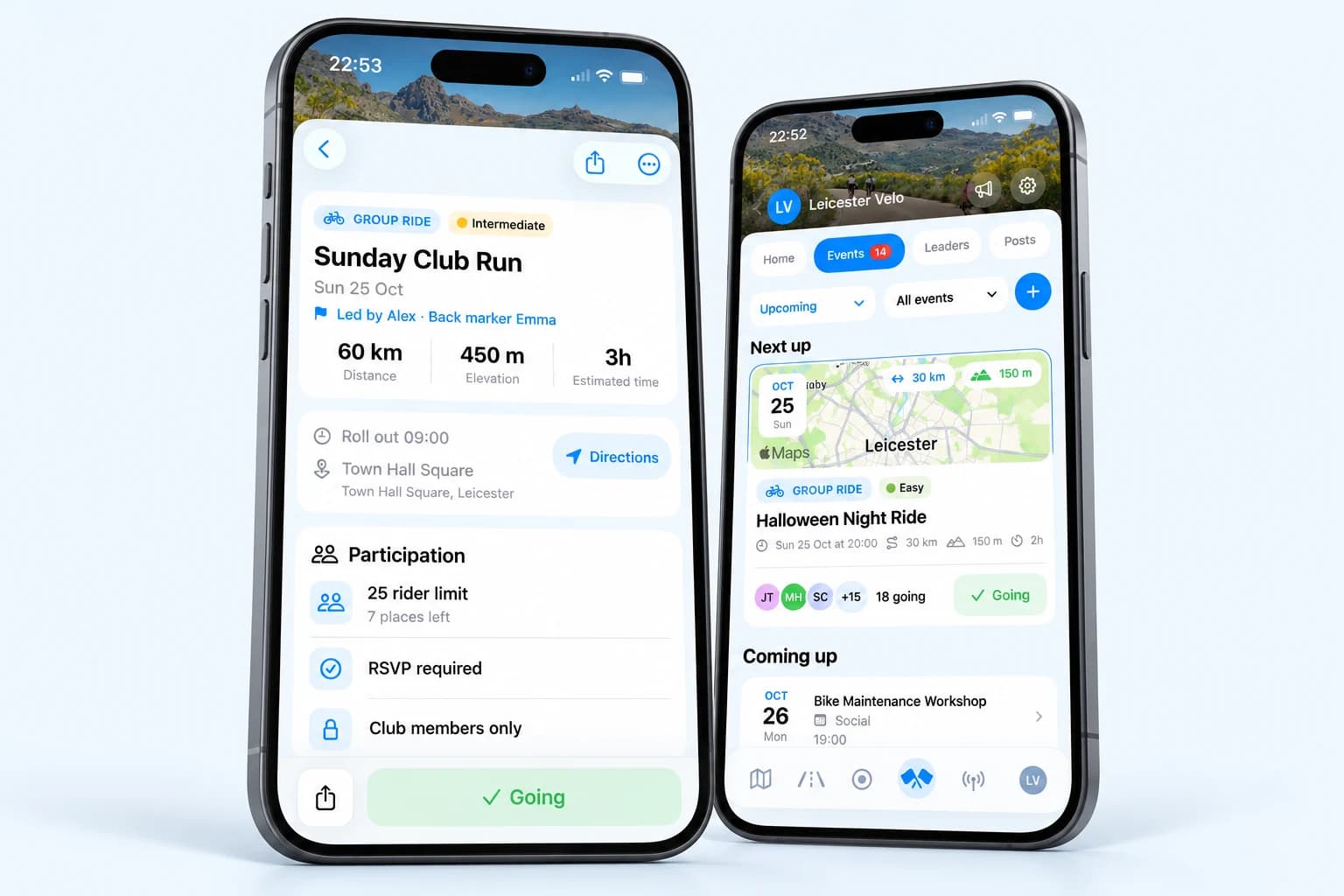
Share club routes, distance, climbing and the start location. Attach a GPX so riders can take the route with them, and add planned café stops.
See who’s coming, set rider limits and organise pace groups with their own capacity and waitlists. Recurring rides keep the weekly club run on the calendar.
Give each ride a clear structure. Name the people leading and bringing up the rear, so riders know who to look for at the start.
Club life
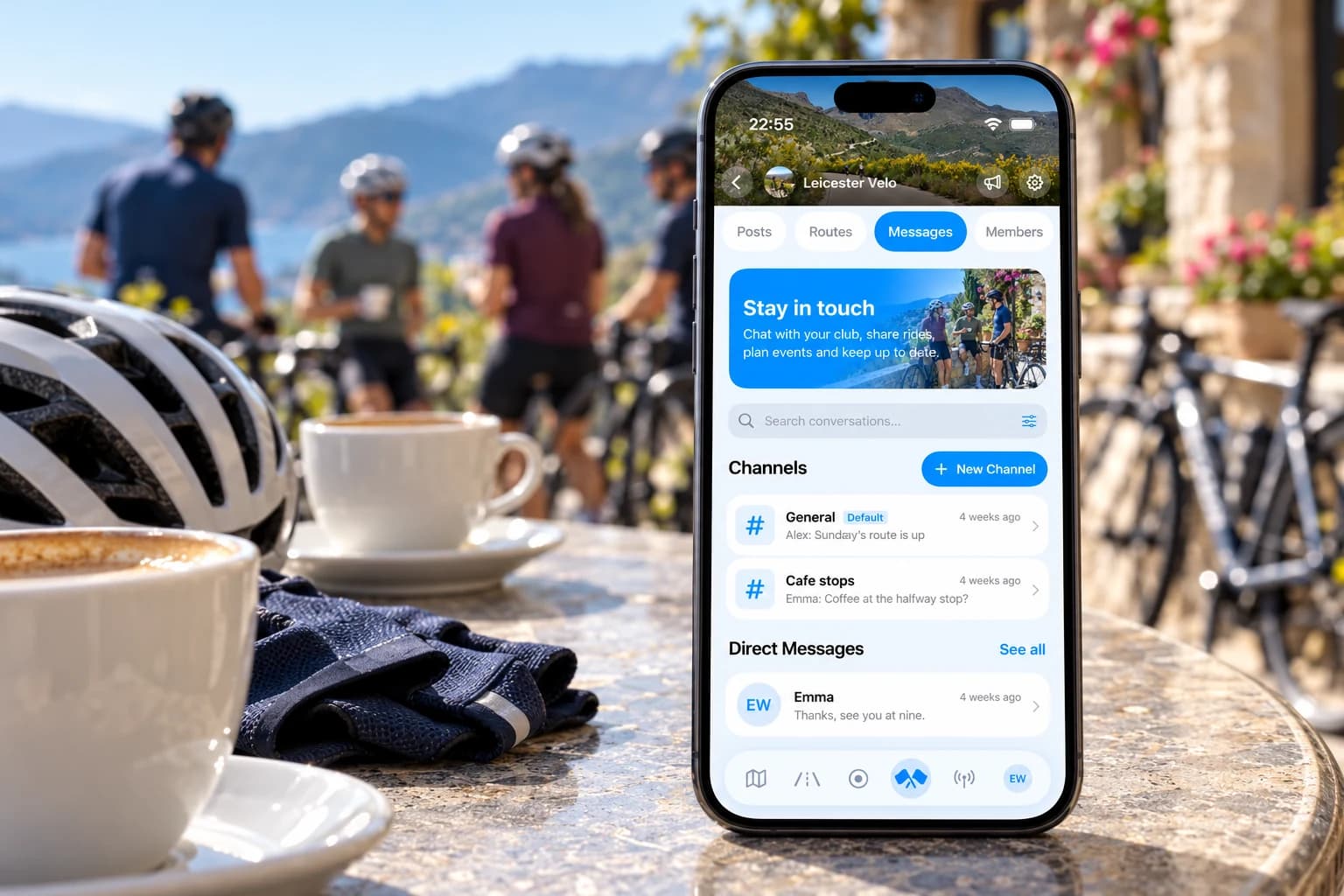
The best part of a cycling club is the people. Keep the conversation, the weekend plans and the post-ride photos connected to the club they belong to.
Keep club chat organised by conversation, from general updates to specific riding plans. Search the inbox and message a clubmate directly. Club messaging is part of Premium.
Give important updates a home in the club’s Posts tab. Pin an announcement, ask a question or run a poll, with replies kept alongside the original post.
Put the workshop, coffee stop or end-of-season dinner on the calendar too. Members can RSVP to socials and share photos from club events.
Competition
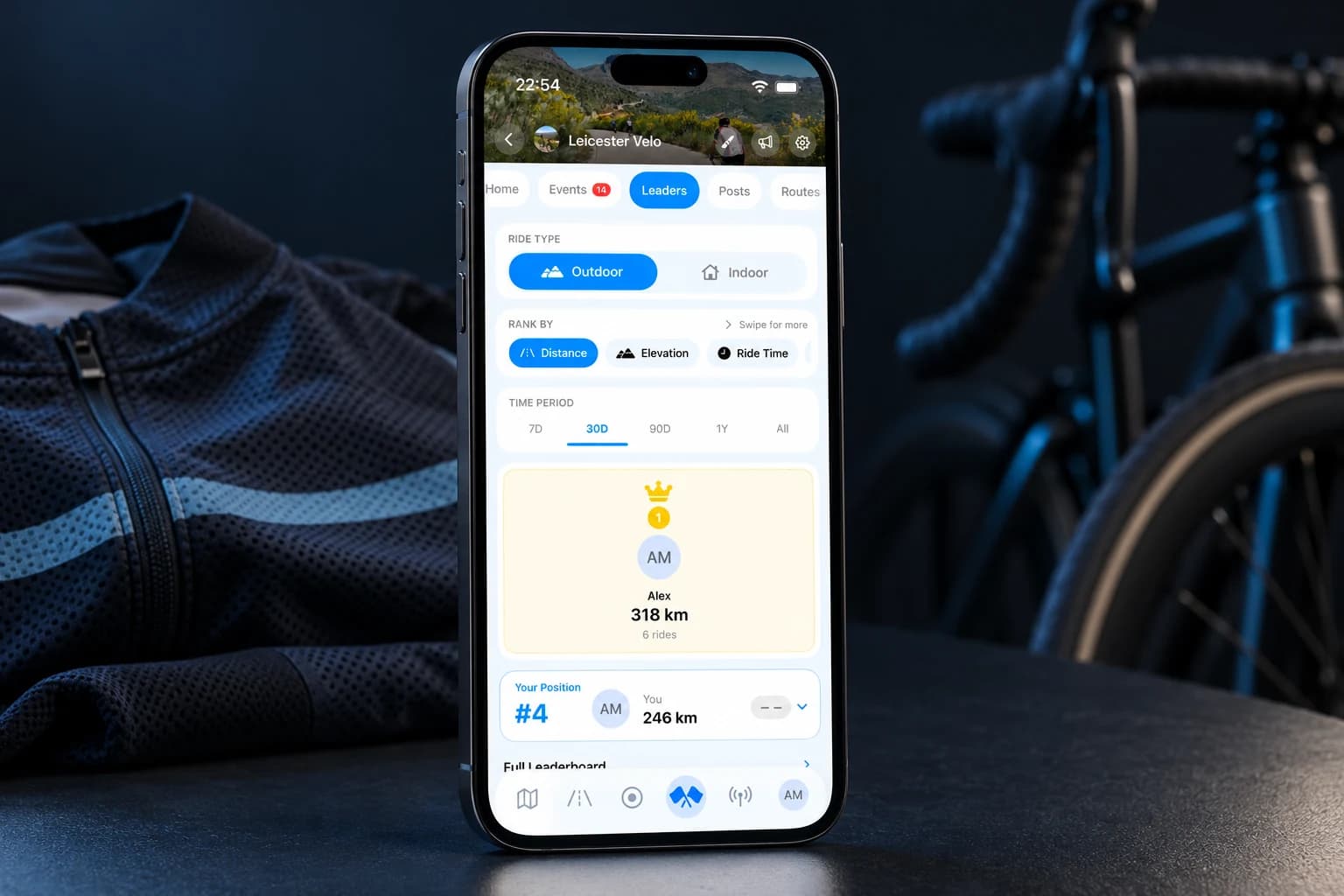
Club leaderboards and shared territory give the next ride something extra. Follow your own progress, encourage the people around you and give the whole club something to ride for.
Compare distance, elevation, ride time and other riding categories across different time periods. Outdoor and indoor standings stay separate.
Bring individual territory claims into your club’s story. Ride new roads, defend familiar ones and see your club’s territory on the map.
Run your club
Practical cycling club management tools for the people who make the ride happen. Organise on your phone, or open the club dashboard on a computer when you need more room.
Open club dashboardPlan who’s leading, back marking and helping out. Assign the roles for upcoming rides and arrange cover when plans change.
Search the member list, manage requests and share responsibilities with admins and ride leaders. Keep access appropriate to each person’s role.
Give appointed ride leaders the tools to manage attendance at the start. Sign-on and emergency-contact access are controlled by club and event permissions.
Review club riding and event activity over time. See participation and the bigger picture beyond one weekend’s ride.
Get started
Choose Create a Club in Atlas and submit your club’s details for review. Club creation requests need approval before the club is live.
Once approved, share your club invite. Riders can join from iPhone or Android using their Atlas account.
Add the route, meeting point, start time and people leading the ride. Let members RSVP and pick their pace group.
Keep rides, conversations and results together. Use the web club dashboard when a bigger screen makes planning easier.
Pricing
No separate club subscription. Each rider chooses the Atlas plan that suits them.
Compare all featuresA place to join in and get riding.
£0
More ways to connect and compete.
£4.99 / month
or £39.99 / year per rider
30-day free trial
Atlas Premium is £4.99 a month or £39.99 a year per rider, with a 30-day free trial. There is no separate club subscription; riders choose their own plan. UK website prices shown. Local store prices and trial eligibility are shown at checkout.
FAQ
From your first club to your next Sunday ride.
It gives a club one place to organise rides and keep members informed. Atlas brings together group ride planning, event RSVPs, routes, club chat, posts, member roles, ride rotas and leaderboards. Riders use the app on their phones; organisers can also use the web club dashboard.
Yes. Atlas is free for riders to join one club, see its feed, RSVP to events and organise club rides. Ride recording and the Bike Garage are also free. Premium adds club creation, messaging, leaderboards, territory and more. Riders choose their own plan; there is no separate club subscription.
Open Atlas, go to Clubs and choose Create a Club. Submit your club’s details for review. Creation requests need approval. Once approved, invite your riders and put your first ride on the calendar with a start time, meeting point, route and ride leaders.
Atlas is available on the App Store for iPhone and Google Play for Android. Use the same Atlas account you created on the website. The web club dashboard gives organisers a bigger screen for club management. The screenshots on this page show the iPhone interface.
Yes. Club rides can include pace groups, rider limits and waitlists. Members RSVP to the ride and choose their group, while organisers can see the numbers and assign ride leaders and back markers. Recurring events help with a regular weekly club run.
Yes. Club organisers can add shared routes and attach route files to events. Riders can review the distance and elevation before a ride and download the available GPX. Planned café stops and meeting-point directions help everyone prepare.
You can bring club conversations into Atlas using channels, direct messages, event discussions, posts and polls. That keeps riding plans close to the route and event details. Club chat and direct messages require Premium. Your club can decide how much it wants to move across.
Yes. Atlas does not connect to Strava or import Strava history. You can keep using Strava separately, while bringing supported rides into Atlas from Garmin, Wahoo, Hammerhead Karoo, COROS or Apple Health on iPhone. Rides recorded directly in Atlas also count towards eligible club features.
A rota makes it clear who is leading, back marking and helping out on each ride. Appointed leaders can manage sign-on and attendance, with emergency-contact access controlled by permissions. Organisers can also see who has not replied and follow up before the ride.
Yes. Atlas supports scheduled club rides on Atlas Indoor routes. Riders can use a supported computer browser for the 3D ride, with equipment connected through a supported setup. Indoor club leaderboards are separate from outdoor riding. See the Atlas Indoor guide for setup details.
Atlas’s club tools focus on riding, communication and community. An Atlas Premium subscription is an individual rider plan, not your club’s membership dues. Keep your existing arrangements for club fees, affiliation and insurance, and use Atlas alongside them.
UK website pricing is £4.99 a month or £39.99 a year per rider, with a 30-day free trial. There is no separate club subscription. Premium access uses the same Atlas account across devices. Current local prices and trial eligibility are shown at checkout.